 GlideMix
how-to · updated 17 Nov 2026
How to use your rekordbox library in GlideMix
You have spent years on your rekordbox library. Here is how to bring it into GlideMix in a few minutes, with the grids and keys you already fixed.
rekordbox
Get the library ready. Analysing everything first means GlideMix can use the results and has almost nothing left to analyse.
- In Preferences → Analysis → Track Analysis, tick BPM / Grid, KEY and Phrase.
- Analyse your collection (right-click songs → Analyze Track).
- Choose File → Export Collection in xml format and save the file. It holds every playlist and the information of every song in them.
GlideMix
GlideMix reads the file and leaves your rekordbox library as it is.
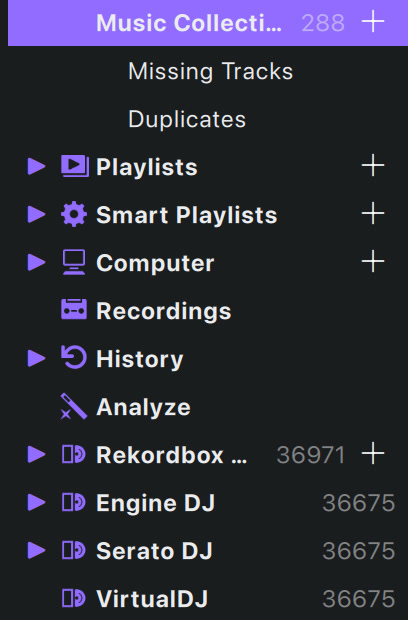
- Click Rekordbox XML in the library sidebar (or right-click it → Import from Rekordbox XML…) and choose the file.
- A big file shows Loading 42%. Then the song count appears, with your playlists and folders underneath.
- Songs bring their beat grids, keys, cue points and phrases. Only songs rekordbox did not analyse are analysed by GlideMix.
- Double-click a song and it joins the mix beatmatched. For many at once: Shift-select them, right-click → Load to → Project, and they join in order, each blended into the next.
- To copy the songs into your own GlideMix collection, right-click Rekordbox XML → Copy Rekordbox XML into Music Collection…
Using another app? Engine DJ, Traktor, Serato, VirtualDJ and djay show up in the sidebar by themselves when they are on your computer, with their songs and playlists (crates in Serato). Lexicon is one switch in Preferences → Music library → Other DJ Apps. On a Mac, click Traktor once so macOS can ask for access to Documents.
iTunes or Apple Music: in the Music app choose File → Library → Export Library. In GlideMix choose File → Add to Library → Import from iTunes Library XML…. Songs and playlists come in; GlideMix analyses them.
Where the steps come from
The steps for other apps follow their makers' own manuals and support pages. Menus can move between versions, so check your version if something looks different.