 GlideMix
how-to · updated 17 Nov 2026
How to stream a DJ mix live (Icecast, Shoutcast)
Internet radio runs on Icecast and Shoutcast servers. GlideMix sends your mix straight to one, with the title of every song, so you need no extra streaming app.
GlideMix
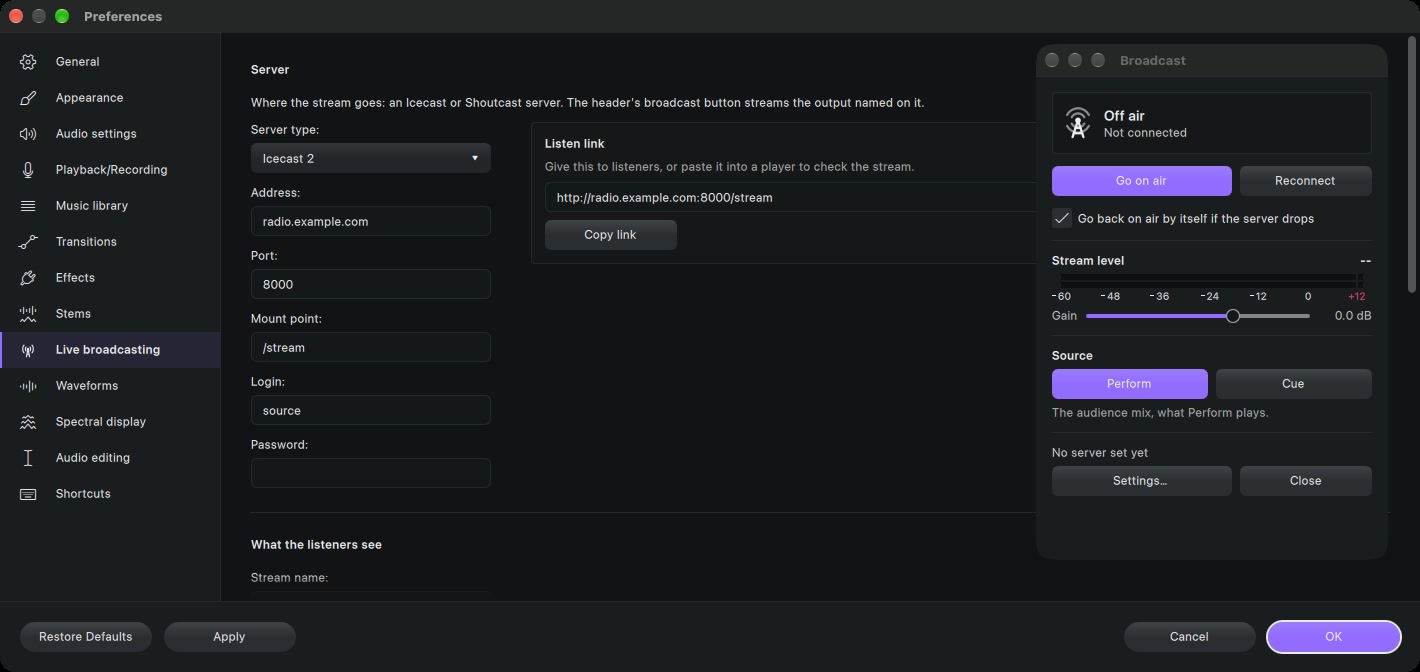
Ask your radio host for: the server type (Icecast or Shoutcast), address, port, password, and the mount point (Icecast) or stream ID (Shoutcast 2).
- Enter them in Preferences → Live broadcasting, with what listeners see: stream name, genre, website.
- Click the broadcast button (the tower) in the toolbar.
- Under Source, choose Perform (the audience mix) or Cue for a test stream.
- Press Go on air, then PERFORM to start the mix.
- Watch the stream level and set the Gain. MP3 at 128 or 192 kbps suits most hosts.
- Share the Listen link. Each song goes to listeners as Artist – Title.
If the connection drops, GlideMix goes back on air by itself when that box is ticked. It stops if the server refuses the password.
Where the steps come from
The steps for other apps follow their makers' own manuals and support pages. Menus can move between versions, so check your version if something looks different.