 GlideMix
how-to · updated 17 Nov 2026
How to make smooth DJ transitions
A good transition is mostly two decisions: where the songs meet, and how the old one leaves. Here is how to shape both, from a simple fade to a full EQ blend on a DJ mixer.
Three rules that always help
- Mix on the phrase. Let the new song come in at the start of a phrase (usually 16 or 32 bars), so changes land where the music expects them.
- One bassline at a time. Two basslines together sound muddy. Swap them on a bar line.
- Fit the keys. Songs in fitting keys can overlap longer.
GlideMix
In GlideMix every pair of songs gets a transition by itself. These steps change it.
- Where they meet: drag the IN marker of the new song or the OUT marker of the old one. Every song after it moves along. Phrases show on the song, so you can see the 16 and 32 bar blocks.
- How they blend: click the name on the pill between the songs for the list: crossfade, bass swaps, filter sweeps, a riser, echo and reverb outs, and your own.
- The default is Volume Fade, MixMeister's: the old song keeps full volume to its OUT, then slides to half over 8 bars and cuts while the new one rises.
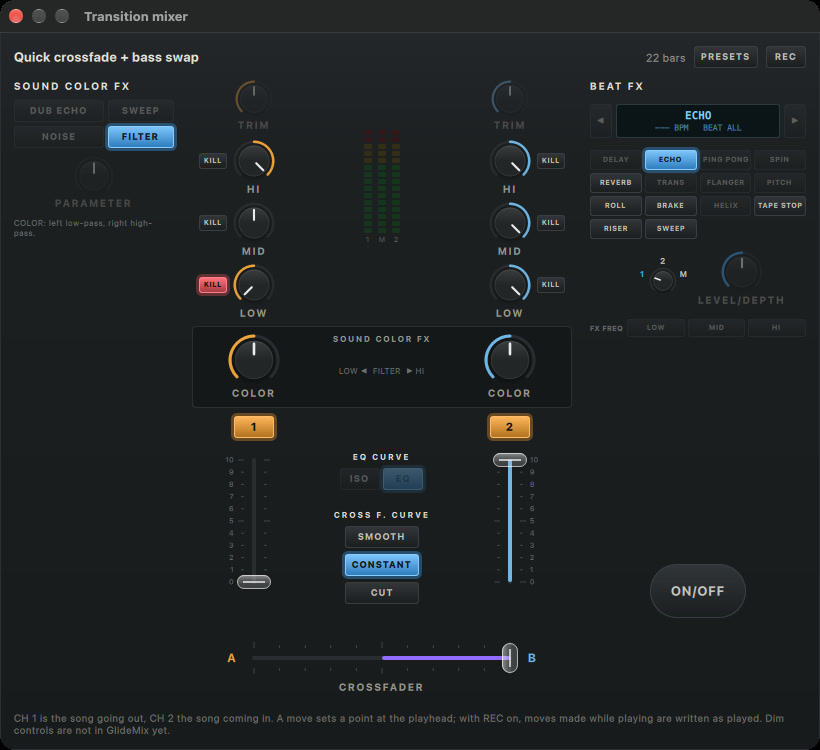
- By hand on a DJ mixer: set Preferences → Transitions → The transition pill opens: The DJ mixer. Click the cog on a pill: CH 1 is the song going out, CH 2 the one coming in, with HI, MID, LOW, KILL, COLOR, faders, crossfader and BEAT FX.
- Switch on REC, press play and ride the knobs. Each move is written into the transition, one undo step per move.
- Build your own transitions (the manual shows how) and they come first in every list.

Where the steps come from
The steps for other apps follow their makers' own manuals and support pages. Menus can move between versions, so check your version if something looks different.