 GlideMix
how-to · updated 17 Nov 2026
How to split a song into stems
Stems let you take the vocal out of a breakdown, keep only the drums for a few bars, or lay one song's vocal over the next one's beat. Here is how in rekordbox and GlideMix.
rekordbox
rekordbox splits a song into VOCAL, DRUMS and INST while you play it in PERFORMANCE mode.
- Open Preferences → Extensions → STEMS and select Enable the STEMS Function.
- The stem buttons appear on the decks, the effect panel and the mixer panel.
- Use ACTIVE STEM to mute a part or play it alone (set MUTE or SOLO in the same preferences tab).
GlideMix
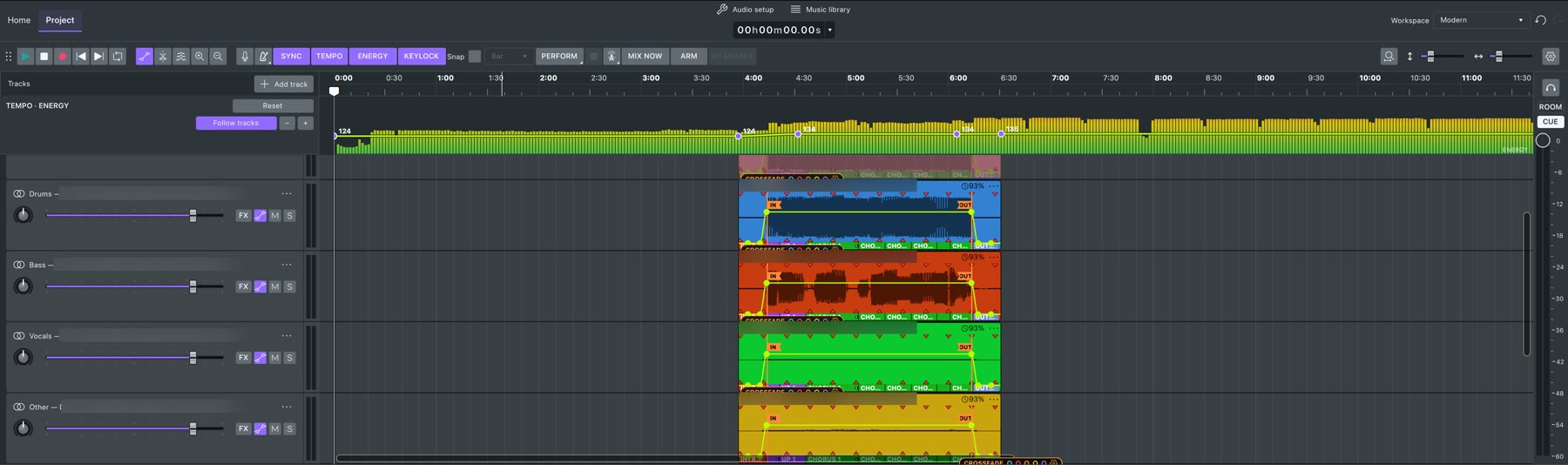
GlideMix splits into four stems (drums, bass, vocals, other) that sit on the timeline as lanes you can edit.
- Install the engine once: Preferences → Stems → Install stems engine (free, about 1 GB).
- Open the track menu (⋯ next to the track name) → Separate stems.
- About half a minute per song on an Apple Silicon Mac. Nothing is uploaded: it runs on your computer.
- The four stems land on lanes under the song, in sync, with the grid and phrases. Mute, fade, filter or automate each one.
- Only part of a song: select it, right-click → Stems → Remove vocals (or drums, bass, other) for an acapella moment or a drum break.
- Stems as samples: right-click a selection → Stems as samples to keep, say, 8 bars of drums as a loop.
Where the steps come from
The steps for other apps follow their makers' own manuals and support pages. Menus can move between versions, so check your version if something looks different.